

Usage Example 2
Warning for Unposted Documents
Section titled “Warning for Unposted Documents”-
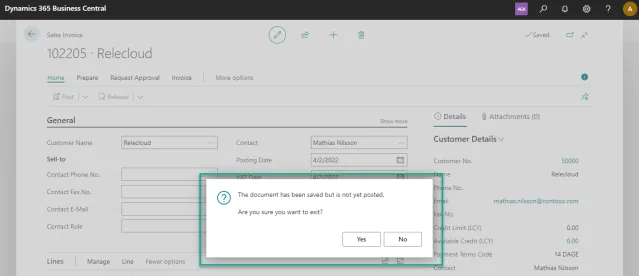
We create a sales invoice and enter the necessary information. When we leave the document without posting we get the message “The document has been saved but is not yet posted. Are you sure you want to exit?”.
We don’t want this message to show on sales invoices for any users.
-
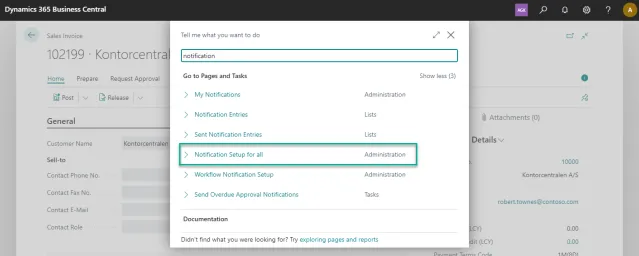
To disable the the message, we open the Notification Setup for all.
-
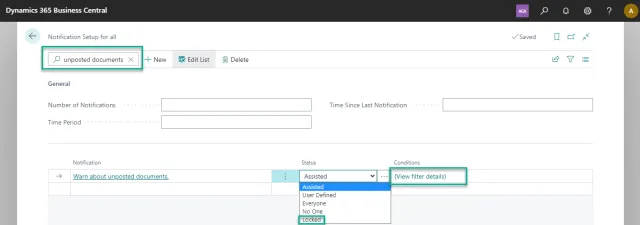
In the Notification Setup for all, we search for unposted documents. First, we set the status to locked, as we don’t want users to be able to change the notifications settings.
Secondly, we click the three dots in order to set conditions for the message.
-
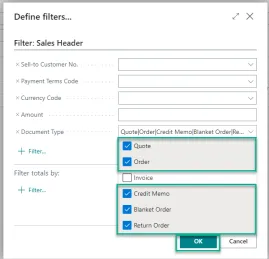
In the Define filters window, we select everything but the Invoice and then clicks OK.
-
When returning to the Notification Setup for all window, the filter should look as shown below.
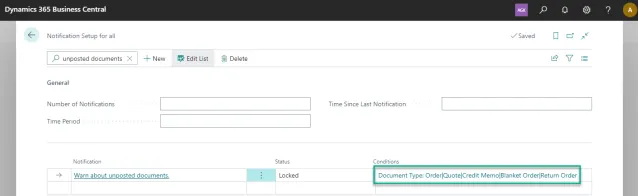
The message is now shown on all documents but the invoices.