

Manual Setup
This guide is going to show to to manually setup the extension and set it up to be used i alot of diffrent countries. If you are from Denmark you can use the assisted configuration, see Assissted setup.
Base informations
Section titled “Base informations”- On the Administration of Extended Producer Responsibility – Packaging role center, select Setup
- Select EPR Setup.
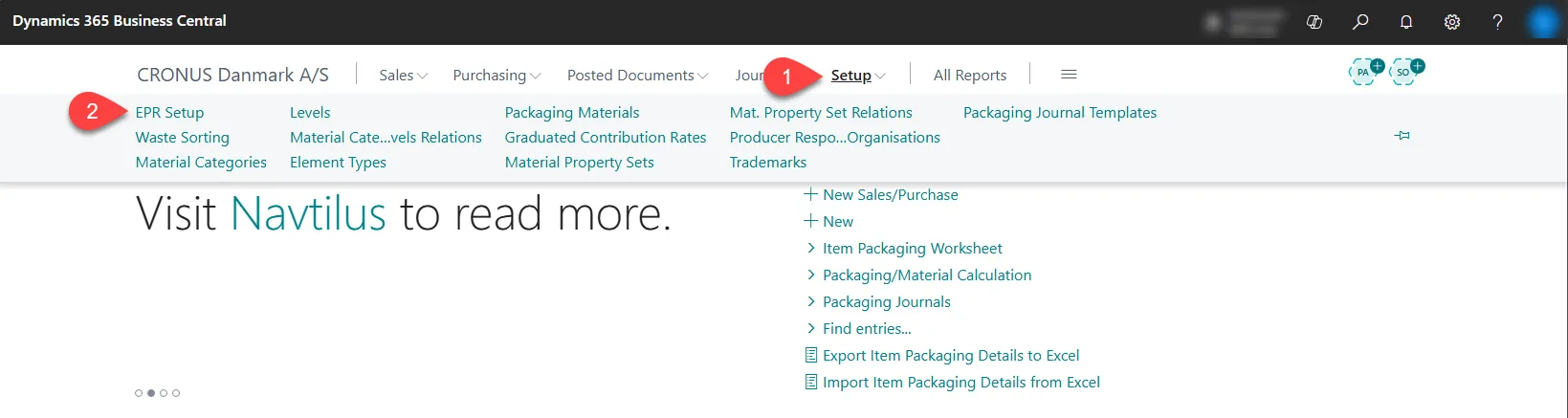
- Select Edit.
- Enter a Unit of Measure (The standard unit of measure is KG).
- Enter the Country/Region Code for the country you operate in.
Recommended settings
Section titled “Recommended settings”It is recommended to disable posting of item packaging entries at the start of the setup process. This prevents the system from creating entries before all packaging details are fully configured and avoids incomplete posting periods.
- Go to Posting section.
- Select the Disable Posting Items Packaging Entries checkbox.
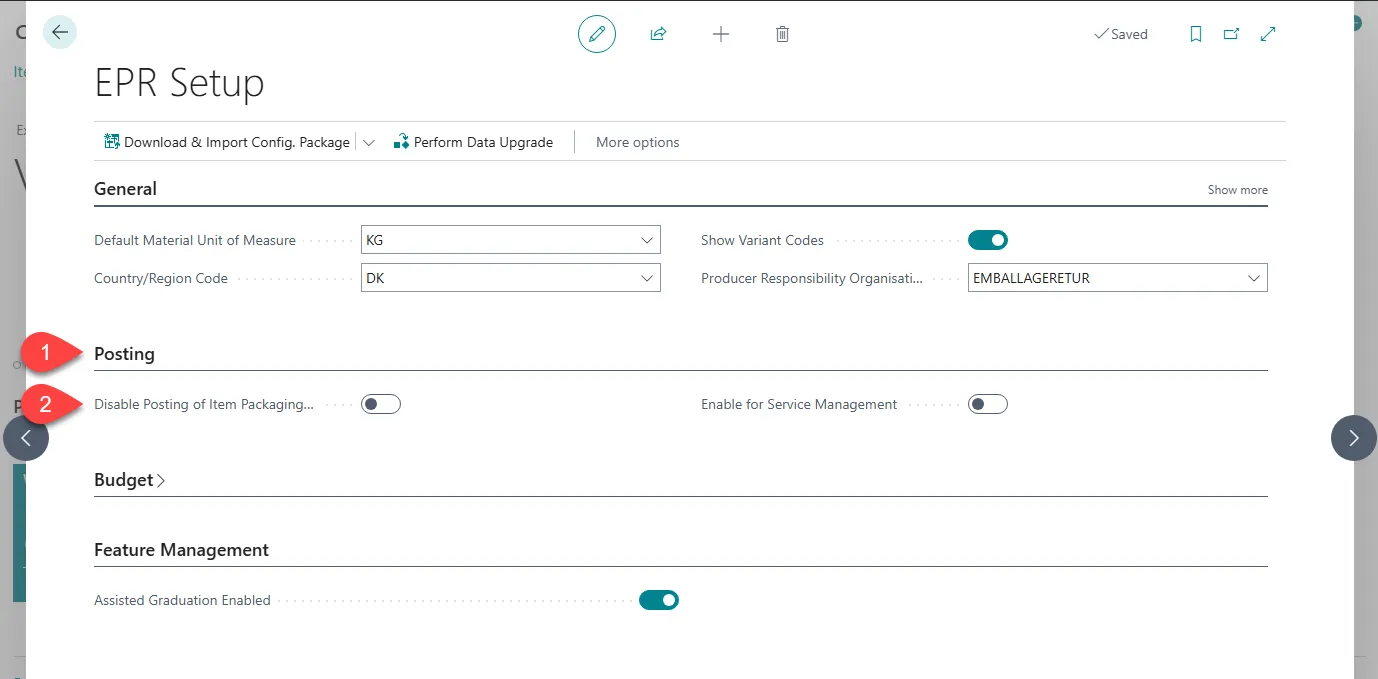 After all packaging details are set up, you can clear this checkbox to enable posting and generate correct values.
Waste Sorting
Section titled “Waste Sorting”Use this page to set up waste sorting options. These options can later be assigned to packaging details and will be included in reporting.
- On the Administration of Extended Producer Responsibility – Packaging role center, select Setup.
- Select Waste Sorting.
- Select + New
- Enter a Code and a Description.
Material Categories
Section titled “Material Categories”Use Material Categories to define the packaging materials that must be reported to local authorities. Material categories describe the type of packaging used. After you create them, you can assign material categories to products to ensure correct reporting. The reporting requirements may vary from country to country. To determine which material categories you must report, contact your local authorities or refer to the European Union PPWR regulations.
- On the Administration of Extended Producer Responsibility – Packaging role center, select Setup.
- Select Material Categories.
- Select + New
- Enter a Code and a Description.
Packaging Materials
Section titled “Packaging Materials”These settings let you define the relationship between waste sorting, material categories, and any subcategories you have created.
- On the Administration of Extended Producer Responsibility – Packaging role center, select Setup.
- Select Packaging Materials.
- Select + New
- Enter a Code and a Description.
Element Types
Section titled “Element Types”This page is intended for reference only and is not used for reporting. Use this setup to describe the type of packaging you work with, such as cans, cardboard boxes, tape, labels, wine bottles, or lids. By adding these details, you help the system categorize packaging more precisely, which makes it easier to filter and analyze your own data later.
- On the Administration of Extended Producer Responsibility – Packaging role center, select Setup.
- Select Element Types.
- Select + New
- Enter a Code and a Description.
Trademarks
Section titled “Trademarks”This page lets you set up trademarks for your packaging details. By assigning trademarks to packaging, you can group and filter packaging reports by customer trademark. This makes it easier to provide customers with their own reporting data based on the trademarks they own or sort out their packaging amount from your repports.
- On the Administration of Extended Producer Responsibility – Packaging role center, select Setup.
- Select Trademarks.
- Select + New
- Enter a Code and a Description.
Packaging Journal Templates
Section titled “Packaging Journal Templates”This page lets you create packaging journals for later use.
- On the Administration of Extended Producer Responsibility – Packaging role center, select Setup.
- Select Packaging Journal Templates.
- Select + New
- Enter a Code and a Description.