

VANA API (Add-on)
This guide is for the VANA API add-on and is therefore not included in the standard solution.
Once the add-on has been purchased and set up, you will be able to report your packaging details directly to the VANA portal from Business Central.
Set up the system
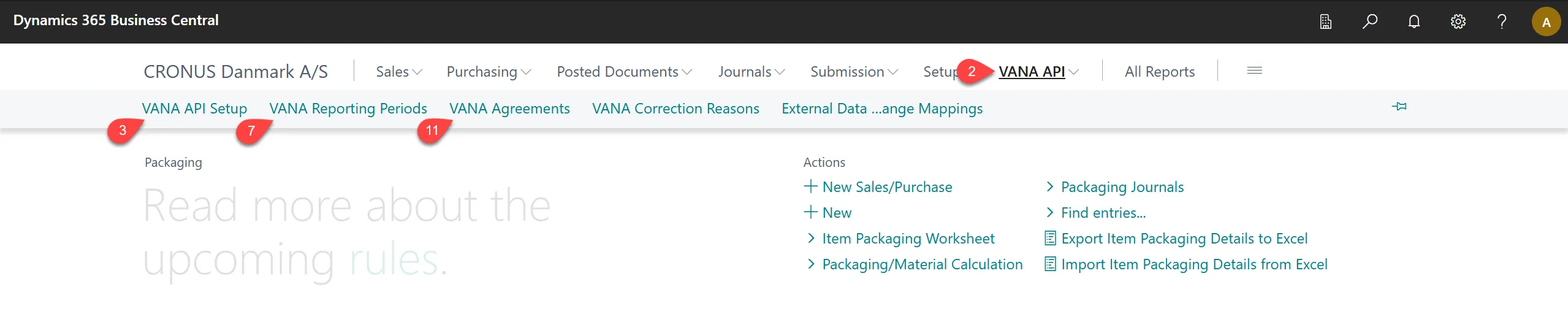
Section titled “Set up the system”- On the Administration of Extended Producer Responsibility – Packaging role center.
- Select VANA API.
- Select VANA API Setup.
- Enter your API details from the VANA Portal on this page.
- Select back to the rolecenter.
- Select VANA API.
- Select VANA Reporting Periodes.
- Select Get periods from VANA
- Select back to the rolecenter.
- Select VANA API.
- Select VANA Agreements
- Select Get Agreements from VANA
Repport to VANA
Section titled “Repport to VANA”Once you have completed your packaging calculations, transfer them to the Submission Journal.
- On the Administration of Extended Producer Responsibility – Packaging role center.
- Select Packaging/Material Calculation.
- Create a calcuation of your packing consumption.
- Select Transfer to Submission Journal.
- On the Packaging Submission Journal select Submit in the ribbon to send your details to VANA.