Calculate and Export Packaging Usage
Use this procedure to calculate and export packaging usage data for reporting.
Substract data for repporting
Section titled “Substract data for repporting”-
Select Search (Alt+Q) in the upper-right corner,.
-
Enter Packaging/Material Calculation, and then choose the related link.
-
Set the required filters at the top of the page.
-
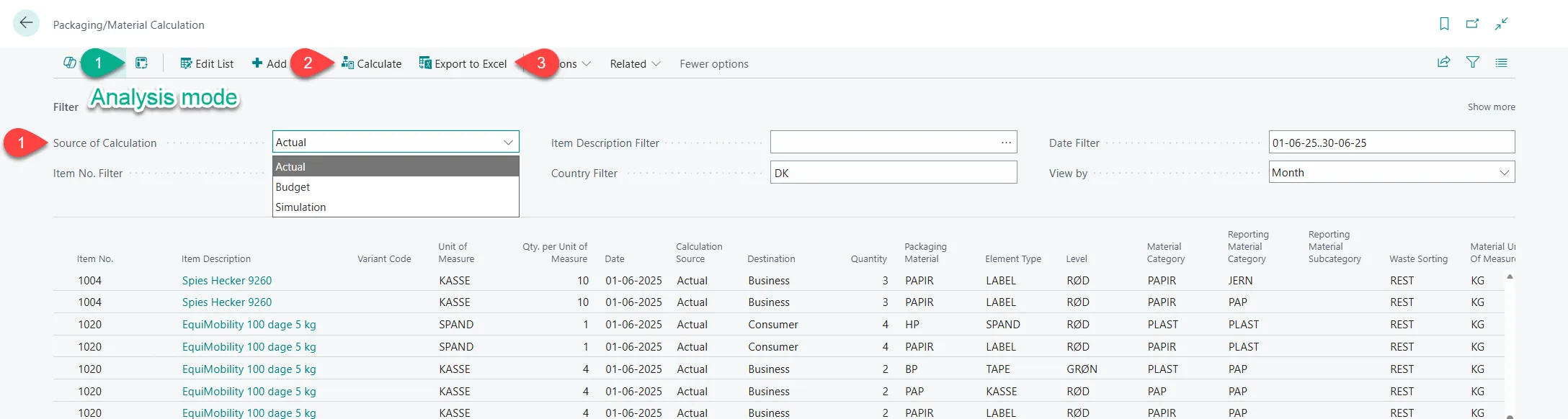
In the ribbon, select Calculate. The system generates a list based on the selected filters.
-
Select Export to Excel. The data is exported to an Excel file.
-
Use the exported data for reporting to your local authorities.
Calculation source (optional)
Section titled “Calculation source (optional)”When calculating packaging usage, you can choose the calculation source:
-
Actual: Uses the actual packaging consumption entries recorded in the system.
-
Simulation: Calculates packaging consumption retrospectively based on posted sales in Business Central and the current packaging setup. Note that simulation always uses the current packaging details. If packaging details were changed during the selected period, earlier versions of the setup are not used in the calculation.
Analysis mode (optional)
Section titled “Analysis mode (optional)”After the list is created, select Analysis mode in the ribbon to open analysis mode. Create a pivot, configure the required fields and measures, and save the analysis view. The saved view can be reused for future reporting.